Writing together
Many songs are written by two: one writes, the other listens hard, or you take turns. In VersFlow you share one song at a time. Everything else – your other songs and your Hookbook – stays private.
Sharing a song
You need a free account for this, and so does the person you invite.
- In the song list, open the song's ⋯ menu and choose Invite.
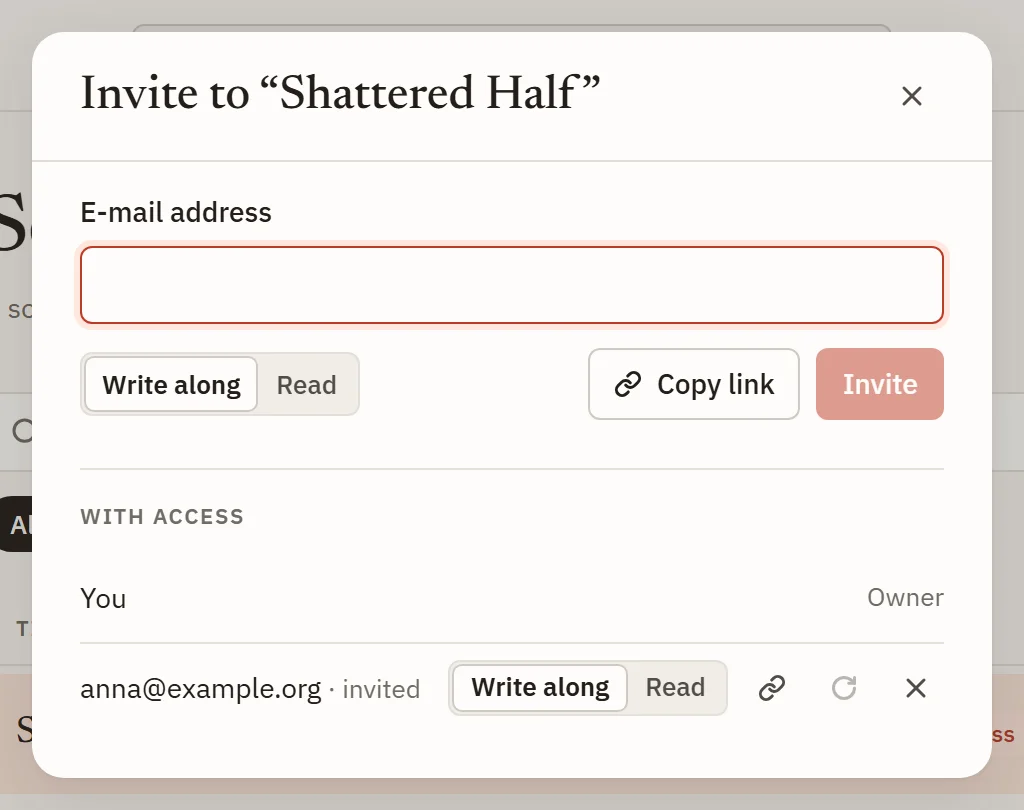
- Enter an email address and choose Write along or Read.
- Click Invite. As soon as they sign in with that address, the invitation waits in their song list.
Instead of an email you can choose Copy link and send the link yourself. It works for one person, once, for seven days.
Writing together
Whoever may write along writes live in the same text as you, in the lyrics of every variant and in the sketches: you see every letter as soon as it is typed, and a line with their name shows where the others are writing. Only the very first change in a shared song takes a moment to reach everyone. Write in the same line together and every letter of both of you stays. Ctrl + Z takes back only what you wrote yourself, and the verse numbers stay right even when two of you add a verse at the same moment. Someone writing in another variant does not change yours; a hint shows where they are.
Under With access in the same dialog you change rights or take someone out again.
Comments
- Select a few words and click the speech bubble that appears beside them, or press Ctrl + Alt + C.
- Write your comment. It sticks to exactly those words and moves with them when the lyrics change.


Everyone who sees the song can reply, even those who may only read. ✓ marks a comment as done.
On a phone, select the words and tap + Comment at the bottom. The comment opens small above the keyboard, with your lyrics in view above it. A tap on a speech bubble opens that comment the same way. All comments are listed under Notes.
Good to know
- Comments work without an account too, in your own songs: as a note right where it belongs.
- A comment is never part of the lyrics. It shows up in no export and not in focus mode.
- When someone comments in a shared song, you get an email – at most one every three hours per song. Switch it off in Settings under Account → Mail about comments.
- With an account, your songs are on all your devices.